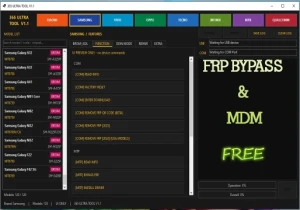
365 Ultra Tool V1.1 Free Android Tool
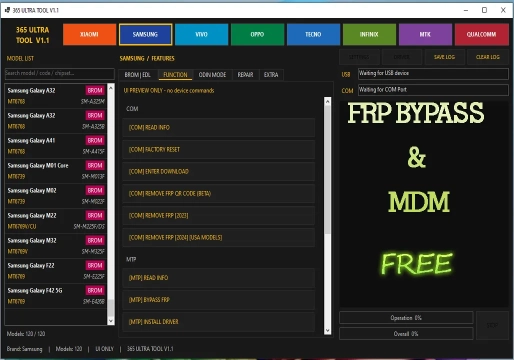
The 365 Ultra Tool V1.1 is a Windows utility designed for Android smartphone maintenance, combining detection, USB communication, diagnostics, and technical operations into a single interface. It is a free tool that consolidates resources typically scattered across paid solutions, making it attractive for technicians seeking a low-cost alternative. However, it requires extra caution regarding its source and the inherent risks of unofficial free tools.
Essentially, the tool is an executable program for Windows that communicates with Android devices via protocols such as ADB, Fastboot, and EDL (Emergency Download Mode). Its main advantage is the attempt to group operations for multiple manufacturers and platforms — Qualcomm, MediaTek, and Unisoc — in one place, without requiring paid licenses or credits.
What is it used for in technical support?
In the workshop, 365 Ultra Tool V1.1 is useful in three main areas:
- Unlocking and Reset: Removal of FRP (Factory Reset Protection), Mi Account reset, bootloader unlock/relock, and userdata reset.
- Firmware Operations: Flashing firmware on Qualcomm and MediaTek devices, reading and writing partitions, EFS backup and restoration, and partition management via GPT.
- Diagnostics and Communication: Reading device information, supporting ADB and Fastboot, SOC detection, and accessing diagnostic modes.
Relevant Functions and Resources by Platform
The tool organizes its operations by platform. Below are the most relevant features for daily technical work:
Qualcomm
- GPT reading and firmware flashing.
- Reading, writing, and erasing partitions.
- FRP reset and factory reset.
- Mi Account reset.
- EFS backup and restoration.
- Loading Firehose and Patch files.
- Access to Qualcomm EDL Mode for advanced repairs.
MediaTek
- Support for Scatter files.
- Selection of preloader and Download Agent.
- RPMB operations (reading, writing, erasing, backup, and restoration).
- Safe format and Meta mode.
- Userdata and FRP reset.
- Bootloader unlock/relock.
- DM Verity correction and IMEI patching.
- Access to MediaTek BROM Mode when necessary.
Unisoc
- FRP bypass for Tiger T7250.
- Automatic SOC detection.
Cross-Platform Functions
- ADB and Fastboot support.
- Partition management.
- Reading memory and device information.
- Requires enabling USB Debugging for certain functions.
Watch the Support Video
How to Use: Essential Procedures
There is no extensive official manual publicly available for this version. The procedures below reflect the typical flow of similar tools and the declared functions:
- Preparation: Install the appropriate USB drivers for the device's platform (Qualcomm, MediaTek, or Unisoc). Disable antivirus and Windows protections that might block execution, and run the program as administrator. Ensure you have the Android SDK installed if you plan to use advanced ADB commands.
- Connection:
- For ADB/Fastboot operations, enable USB debugging on the device and connect it to the PC.
- For EDL mode (Qualcomm) or Download mode (MediaTek) operations, put the device in the corresponding mode before connecting. For Qualcomm, load the Firehose file compatible with the chipset; for MediaTek, select the appropriate scatter file and DA.
- Executing an Operation:
- Wait for the device to be detected in the interface.
- Select the correct platform tab (Qualcomm, MediaTek, or Unisoc).
- Choose the desired function (e.g., Reset FRP, Flash Firmware, Read Partition).
- Confirm the requested parameters (partition, address, firmware file).
- Start the process and do not disconnect the cable until completion.
Compatibility and Requirements
| Category | Details |
|---|---|
| Operating System | Windows 10 or 11 (64-bit recommended). |
| Supported Brands | Samsung, Xiaomi, Redmi, Poco, Vivo, Oppo, Realme, Tecno, Infinix, Itel, Huawei, Nokia, and Motorola. |
| Chipset Platforms | Qualcomm, MediaTek, and Unisoc. |
| Hardware Requirements | Functional USB ports, quality cables, and updated drivers for each platform. For EDL operations, a good quality USB cable is critical. |
Limitations and Important Cautions
Before using the tool, consider the following critical points:
- Limited Support: As it is free and lacks comprehensive official documentation, there is no guarantee of support or updates. Functions may fail on specific models or newer firmware versions.
- Risk of Bricking: Operations such as firmware flashing, partition writing, and IMEI patching are irreversible in case of error. Always back up data when possible and confirm firmware compatibility with the exact model before any writing. Understanding the difference between Stock ROM and Custom ROM is vital to avoid incompatibilities.
- Legal Aspects: IMEI patching is illegal in many jurisdictions, including Brazil. Using the tool to alter device identifiers must comply with local laws.
- Security: Tools involving Root access or deep modifications like those made by Magisk should be used with caution. On Samsung devices, keep in mind that Knox may be permanently affected.
- Additional Protections: Be aware of ARB (Anti-Rollback) on Android to avoid dangerous downgrades, and Mi Account Lock on Xiaomi devices.
Frequently Asked Questions (FAQ)
Is 365 Ultra Tool V1.1 safe to use?
As it is a free tool from an unofficial source, it requires extra caution. There is no guarantee of official support, and there is a risk of malware if downloaded from untrusted sources. Always use antivirus software and back up your data.
Do I need to enable OEM Unlock to use the tool?
Yes, for many operations such as bootloader unlocking and flashing custom recoveries like TWRP Recovery, it is necessary to enable OEM Unlock in the Android developer settings.
What should I do if the phone gets stuck in a boot loop after using the tool?
Try accessing Recovery Mode to perform a data wipe or factory reset. If that doesn't work, you may need to re-flash the original Stock ROM.
Does the tool work on all Android models?
No. Although it supports many brands (Samsung, Xiaomi, Motorola, etc.), compatibility depends on the chipset (Qualcomm, MediaTek, Unisoc) and firmware version. Very new models or those with specific protections may not be supported.
Is it legal to change the IMEI with this tool?
No. Changing the IMEI is illegal in most countries, including Brazil. The tool may have technical resources for this, but using it for such purposes violates the law and can permanently block the device on carrier networks.
⚠️ Warning!
Before using the Program, you need to temporarily disable your Antivirus because it may flag the file as a potential threat, but it is a false positive.
I test every program I share here before posting it, however I cannot guarantee 100% that they are completely safe since I am not the creator of the programs.
I strongly recommend that you create a restore point on your computer before installing any program, so if you notice that the program is not safe, you can simply revert the restore point to the previous state.
Important: if you do not trust it, do not use it and look for other options.
📥 Download Information
- Scroll down to the Download section.
- Check the box I agree to the terms of use
- Then click on Reveal links
- Wait 5 seconds
- Use any of the 2 links
- ⚠️Warning: The download file is compressed with the password “mixdow.com”.
🔐 Site Download Section
To unlock the links, check the box below and click the button:
To get started, make sure you have the basic drivers installed:
DOWNLOAD REQUIRED DRIVERS HEREAttention: Some New FRP Tools use a "bypass" method that requires a special driver filter called LibUSB.
DOWNLOAD LIBUSB HEREFor Unlock Methods that require ADB or Fastboot Mode:
DOWNLOAD ADB AND FASTBOOT DRIVERS HERERequired to put the Qualcomm device into Emergency Download (EDL) mode.:
Download Qualcomm HS-USB QDLoader 9008 DriverI do not endorse or encourage the unlocking of stolen/blocked cell phones.
Anyone who uses these posts for any illegal purpose will be solely responsible for their activity.
Legal Notice:
The content of this Website, including any information about software, downloads, and third-party links, is provided for informational purposes only. The author of this Website is not responsible for any damage, directly or indirectly, caused by the download, installation, or use of any software mentioned on this website.
Disclaimer:
By accessing and using this Website, you agree to hold the author harmless from any liability for:
Hardware or software damage:
Including, but not limited to, viruses, worms, trojans, or other malicious code that may infect your system.
Data loss:
Copyright violations:
Downloading and using software without the proper licenses may result in copyright violations.
Illegal acts:
Misuse of software may be considered an illegal act and result in legal consequences.