What is W.M.T Samsung FRP Tool?
W.M.T Samsung FRP Tool is a utility developed specifically for the maintenance of Samsung devices, focusing on models equipped with Qualcomm and Exynos platforms.
The tool uses Download Mode as the primary method of communication with the device. In the interface, it is possible to select the device's platform and, depending on the version and model, perform operations related to FRP (Factory Reset Protection).
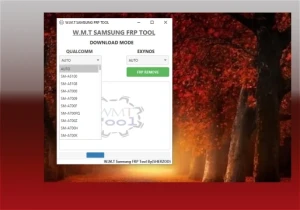
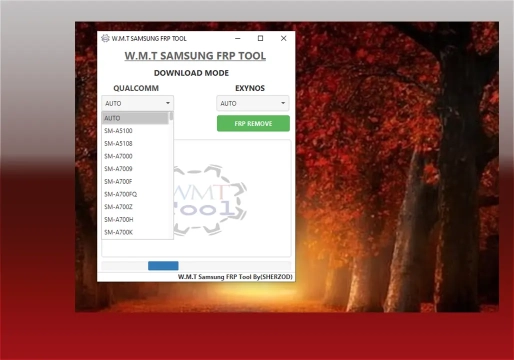
The base documentation indicates that the content should be practical and objective. The interface itself makes this division clear: on one side appear the options for Qualcomm, while on the other exists the Exynos module, accompanied by the main operation button.
What is it used for?
The main objective of this tool is to assist technicians in maintenance procedures related to Factory Reset Protection (FRP) on compatible Samsung devices.
FRP is an Android security mechanism created to hinder the use of a lost or stolen phone after an unauthorized reset. When active, the device requests authentication from the previously associated Google account.
In technical support, this type of tool is used on devices whose owner has the right to maintenance, especially when the device has been restored and continues to request previous authentication. It is crucial to differentiate legitimate FRP removal on an authorized device from attempts to bypass protections on equipment of unknown origin.
Main Features
Support for Qualcomm processors
The interface has a specific area named QUALCOMM, intended for Samsung devices equipped with this platform. The program presents a list of models selectable directly by the technician. Among the models visible in the interface are:
- SM-A5100
- SM-A5108
- SM-A7000
- SM-A7009
- SM-A700F / SM-A700FQ
- SM-A700Z / SM-A700H / SM-A700K
Note: The presence of a model in the list does not guarantee functionality across all firmware versions. Compatibility varies according to regional variant and tool version.
Support for Exynos
The program also presents a specific module for EXYNOS. This feature is vital, as Samsung uses different hardware platforms within the same device family. Correctly identifying the processor before starting the procedure is a fundamental technical step.
Automatic and manual model selection
The interface initially offers the AUTO option, in addition to manual selection. Correct choice is essential when working with older versions or regional variants, as visually similar models may use distinct firmwares.
FRP REMOVE Function
The FRP REMOVE button is the central function of the interface. Its objective is to perform the protection removal operation on compatible devices. Success depends on the model, chipset, firmware, and version of the tool used.
Compatibility: Is it universal?
No. This is one of the most important points for the technician to observe. W.M.T Samsung FRP Tool is directed specifically at Samsung devices from the Galaxy A families (older generations) and other models with listed Qualcomm or Exynos chips.
Functionality may depend on:
- Exact device model;
- Regional variant;
- Processor (Qualcomm vs Exynos);
- Android version;
- Installed firmware;
- Binary/Bootloader;
- Security patch;
- Device state.
Download Mode and Communication
Download Mode is a boot mode used in Samsung devices for maintenance operations. It is in this environment that service tools establish specific communication with the device.
For Windows systems, it is essential to have the correct drivers. Samsung officially provides the Samsung Android USB Driver (currently version 1.9.5.0), intended for USB communication of devices.
System Requirements
To use W.M.T Samsung FRP Tool, the maintenance environment must be properly prepared:
| Component | Details |
|---|---|
| Operating System | Computer with Windows compatible with the tool version. |
| USB Drivers | Official Samsung drivers installed for proper recognition. |
| Java | Attention: If you do not have Java installed, it will be necessary to install it to use the program (the program itself directs to the link). |
| USB Cable | Quality cable, in good condition. Avoid USB hubs. |
| Battery | Sufficient charge to avoid interruptions during the process. |
How to Download W.M.T Samsung FRP Tool
To download the file available on this page, follow the steps below:
- Scroll the page to the Download section.
- Check the box "I agree to the terms of use".
- Click on "Reveal links".
- Wait approximately 5 seconds.
- Use any of the two provided links.
Password for the compressed file: mixdow.com
How to Use: Step-by-Step
The procedure should be treated as a technical maintenance routine, not simply as clicking a button.
- Identification: Confirm the exact model, commercial code, and processor (Qualcomm or Exynos).
- Preparation: Install the necessary drivers and check the battery level.
- Connection: Place the device in the appropriate communication mode (Download Mode) and connect via USB.
- Recognition: Confirm if the computer has recognized the device in Device Manager.
- Configuration: Select the corresponding platform/model in the W.M.T tool.
- Execution: Execute only the operation compatible with the authorized service.
Best practices before using
- Check the physical condition of the device and the quality of the USB cable.
- Confirm the Binary/Bootloader and Security Patch.
- If the device still allows system access, back up data, as resets eliminate personal information.
Common Problems and Solutions
Device not recognized
Common causes include missing driver, defective cable, unstable USB port, or the device not being in the correct mode. Always check the Windows Device Manager.
Model does not appear in the tool
This indicates that the W.M.T version does not support that specific model or regional variant. Do not force the procedure.
FRP operation does not work
There may be incompatibility with Firmware, Android, Security Patch, or Binary. Do not repeat the procedure indiscriminately; confirm compatibility first.
Communication error
Check the USB driver, cable, USB port, and whether the chipset has been correctly identified in the tool.
Does W.M.T Samsung FRP Tool work on current devices?
This is an important limitation. Available information associates this tool with older Samsung models. On recent devices, changes in Android, security mechanisms, and update patches may prevent legacy tools from working. Do not consider this solution as universal for the current Galaxy line.
FRP is a security protection
FRP is not an arbitrary lock, but a protection mechanism for the Android ecosystem. Samsung recommends removing associated accounts before selling or handing over a device. In cases of legitimate lockout where the user cannot authenticate the account, it is recommended to go to an authorized assistance center with proof of ownership.
Frequently Asked Questions (FAQ)
Does W.M.T Samsung FRP Tool support Qualcomm?
Yes. The tool has a specific module named QUALCOMM for Samsung devices with this platform.
Does W.M.T Samsung FRP Tool support Exynos?
Yes. The interface has a specific area for devices with Exynos processor.
Does the program work on any Samsung?
No. Compatibility depends mainly on the model, chipset, firmware, and tool version. Very recent models may not be supported.
Is it necessary to install drivers?
Yes. The computer needs to have Samsung USB drivers installed to establish proper communication with the smartphone.
Can FRP be removed from any Samsung device?
No. The function strictly depends on the compatibility of the model, firmware, security patch, and version of the tool used.
Does the program work for current Samsung devices?
There is insufficient basis to claim universal compatibility with current models. W.M.T is more associated with previous generations of Samsung devices.
Conclusion
W.M.T Samsung FRP Tool is a simple and direct tool for the maintenance of specific Samsung smartphones, offering support for Qualcomm and Exynos platforms through Download Mode. Its differential lies in the simplicity of the interface and direct model selection.
However, due to the strong dependence on factors such as device generation, firmware, and security level, the technician must always verify compatibility before executing any procedure. For solutions on more modern devices, other tools or methods authorized by the manufacturer may be necessary.
🔐 Download Section
To unlock the links, check the box below and click the button:
To get started, make sure you have the basic drivers installed:
DOWNLOAD REQUIRED DRIVERS HEREAttention: Some New FRP Tools use a "bypass" method that requires a special driver filter called LibUSB.
DOWNLOAD LIBUSB HEREFor Unlock Methods that require ADB or Fastboot Mode:
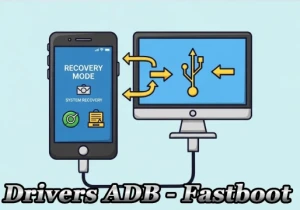
DOWNLOAD ADB AND FASTBOOT DRIVERS HERERequired to put the Qualcomm device into Emergency Download (EDL) mode.:
Download Qualcomm HS-USB QDLoader 9008 DriverI do not endorse or encourage the unlocking of stolen/blocked cell phones.
Anyone who uses these posts for any illegal purpose will be solely responsible for their activity.
Legal Notice:
The content of this Website, including any information about software, downloads, and third-party links, is provided for informational purposes only. The author of this Website is not responsible for any damage, directly or indirectly, caused by the download, installation, or use of any software mentioned on this website.
Disclaimer:
By accessing and using this Website, you agree to hold the author harmless from any liability for:
Hardware or software damage:
Including, but not limited to, viruses, worms, trojans, or other malicious code that may infect your system.
Data loss:
Copyright violations:
Downloading and using software without the proper licenses may result in copyright violations.
Illegal acts:
Misuse of software may be considered an illegal act and result in legal consequences.