FoneTool Unlocker: Solution for iOS and Android Device Management and Unlocking
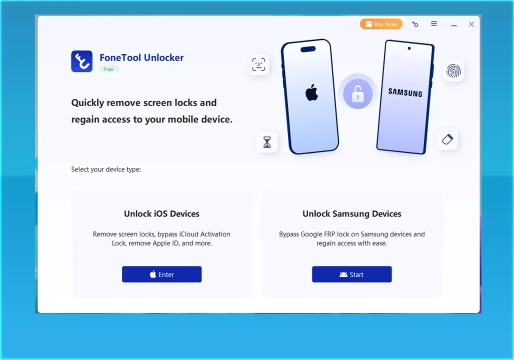
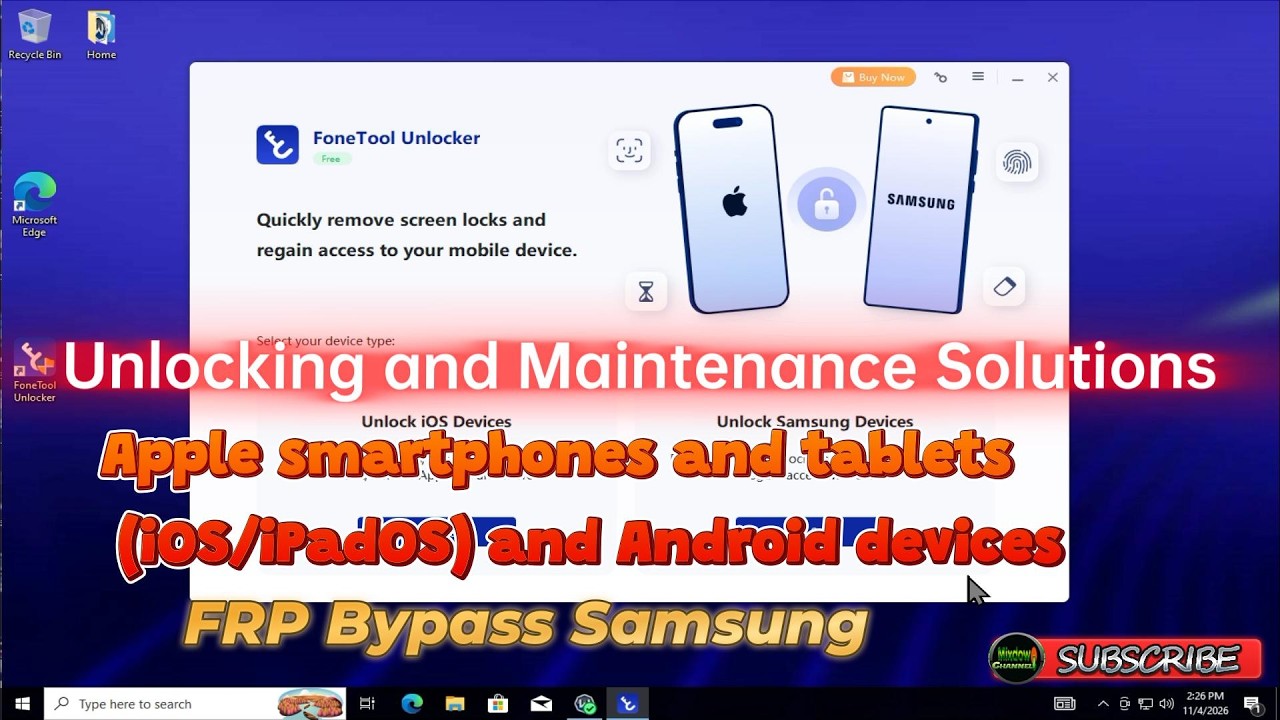
FoneTool is a robust solution developed for mobile ecosystems, running in a Windows environment. The tool combines file management utilities, backup and restore routines, and advanced logical maintenance and unlocking features for Apple smartphones and tablets (iOS/iPadOS) and Android devices.
Designed for both end users and technical assistance laboratories, the program operates connected via a USB interface and supports a wide range of formats and operating systems, allowing low-level data manipulation with high connection stability.
Overview of FoneTool Unlocker Features
The tool is divided into two major areas of operation, offering specific solutions for each ecosystem:
| iOS Features | Android Features |
|---|---|
| Screen Password Removal | Samsung FRP Bypass (Google Account after reset) |
| Apple ID Removal | Support for Exynos and Qualcomm Chipsets (via EDL cable) |
| iCloud Lock Bypass | Execution via Test Mode (*#0*#) |
| Screen Time Removal | |
| Saved Password Manager | |
| iTunes Encryption Removal |
Detailed iOS Unlocking Features
FoneTool Unlocker offers specialized capabilities to bypass access restrictions in the Apple ecosystem:
- Screen Password Removal: Removes numeric passwords (4 or 6 digits), Touch ID, or Face ID in scenarios of broken screen, forgotten password, or unavailable device. Technical note: the screen password removal procedure wipes the device data, in accordance with native iOS limitations.
- Apple ID Removal: Unlinks active Apple ID accounts without the need for a prior password, allowing a new account to be registered.
- iCloud Activation Lock Bypass: Removes the activation lock on compatible devices in cases of unauthorized factory reset.
- Screen Time Passcode Removal: Removes the restrictions password without any data loss on the device.
- iTunes Backup Encryption Removal: Eliminates the encryption password for local iTunes backups without damaging the saved files.
- Saved Password Manager: Scans the device to display saved credentials for Wi-Fi networks, websites, and applications.
Android Unlocking Features (Samsung FRP)
The tool includes the Unlock Samsung Device feature, focused on bypassing FRP (Factory Reset Protection). This is the Google account protection system triggered after a factory restore. The process bypasses system checks through automated routines, granting access to the device without the need for the previous owner's credentials.
Practical Step-by-Step: Removing FRP Lock on Samsung
For bench technicians, the standardized procedure follows the detailed flow below:
Technical Prerequisites
- Data Cable: Standard high-quality USB cable or Samsung EDL engineering cable (mandatory for certain models with Qualcomm processor).
- Battery: Minimum charge of 50% to avoid interruptions during flashing.
- Software: Latest version of FoneTool Unlocker installed on a Windows PC.
- Authorization: Use of the tool must be made exclusively on legally owned devices or with the customer's authorization.
Operating Procedure
- Software Initialization: Open FoneTool Unlocker, go to the Android unlock tab, and click the "Unlock Samsung Device" option.
- Method Selection: Based on the chipset and Android version, select the recommended method (for example, Universal One-Click Removal) and click "Remove Now".
- Enabling Test Mode: On the Samsung smartphone (on the Google account verification screen), tap "Emergency Call" and enter the technical code
*#0*#to access the hidden test menu. This activates Factory Mode. - Authorization and Completion: Once the test mode is displayed on the device, click "Next" in the program on the computer. FoneTool Unlocker will send the debugging commands to remove the Google account. Wait for the "Removal Completed" message; the device will restart with the setup wizard unlocked.
Technical Specifications and System Requirements
To ensure optimal operation, the following minimum hardware and software requirements must be met on the PC:
| Component | Minimum Requirement / Support |
|---|---|
| Processor | Compatible Intel/AMD x86 CPU of 1 GHz or higher. |
| RAM Memory | Minimum of 256 MB. |
| Disk Space | 300 MB free for program installation. |
| Operating Systems (Windows) | Windows 11, 10, 8/8.1, 7 (SP1) and Server versions (2019, 2016, 2012/R2, WHS 2011, SBS 2011). |
| iOS Compatibility | iOS 11 to iOS 27. iPhone 4s to iPhone 17/18, iPad (Pro, Air, Mini) and iPod Touch (1st to 7th generation). |
| Android Compatibility | MediaTek and Qualcomm chipsets (via EDL cable). Android 6+. |
Differences Between Free and Pro Versions
It is important to distinguish the capabilities according to the license purchased:
- Free Version: Allows entering and exiting the iPhone's Recovery Mode and removing encryption from iTunes backups.
- Pro Version: Required to use the other unlocking features, including:
- Removing iCloud Activation Lock;
- Unlocking the iPhone or iPad screen password;
- Removing the Apple ID;
- Bypassing the Screen Time lock;
- Bypassing Google FRP verification on compatible Samsung devices.
Note: To obtain the Pro version, download the program provided on the website and install it on your computer. If you wish to purchase the annual or lifetime license, there is the option to buy directly within the software.
Samsung Model Compatibility
The tool offers specific support for several Samsung lines, divided by chipset type:
Models with MediaTek Chipsets
Includes the A series (A01 Core, A02, A03S, A04, A04e, A05, A06, A10S, M01S, A12, A13, A13 5G, A14, A14 5G, A15, A15 5G, A16, A16 5G, A21, A22 4G, A22 5G, A22 2021, A24 4G, A3 Core, A31, A32, A32 5G, A34 5G, A41), F series (F04, F22, F42 5G, Jump 5G), M series (M01 Core, M01s, M02, M13, M22, M32, M32 5G) and Tablets (Tab A7 Lite, Tab A7 Lite LTE, Tab A7 Lite Wi-Fi, Wide 5, Wide 6).
Models with Qualcomm Snapdragon Chipsets
The Samsung Qualcomm unlocking method supports devices such as the S23 and S24, being compatible with Android 6 and higher versions. It uses Qualcomm EDL Mode for advanced procedures.
American Models (Carrier)
Compatible with American Samsung phones locked by carrier (model suffix "U"), including the SM-S9xxU, N90xxU, F7xxU, F9xxU, A0xxU, A1xxU and A5xxU series. Specific examples include Galaxy S22 (SM-S901U), S21 (SM-G990U), A54 5G (SM-A546U) and A23 5G (SM-A236U).
Competitive Advantages for Technical Assistance
FoneTool Unlocker stands out for several key advantages for professionals:
- Security and Privacy: 100% malware-free software or malicious scripts, ensuring that customer data is not leaked or recorded.
- Market Reliability: Developed by a company with over 17 years of experience in the software market, totaling more than 3 million users in 180 countries.
- Ease of Use: Intuitive interface that reduces the need for complex manual command-line procedures, accelerating service time at the bench.
Conclusion and Technical Verdict
FoneTool Unlocker proves to be a solid multifunctional tool for smartphone maintenance benches. Its combination of data migration utilities and rescue routines with the ability to bypass complex locks (such as Samsung FRP and iOS restriction passwords) makes the program a practical addition to optimize the workflow of technicians and repairers.
Frequently Asked Questions (FAQ)
Does iOS screen unlocking erase data?
Yes. Due to native iOS security limitations, the screen password removal procedure requires restoring the device, which results in data loss if there is no prior backup.
What is the *#0*# code on Samsung?
It is a secret code that activates Factory Mode or Test Mode on Samsung devices. FoneTool uses this mode to establish direct communication with the hardware and perform the FRP bypass.
Does FoneTool work with carrier-locked devices?
Yes, the Pro version supports American Samsung phones locked by carrier (model suffix "U"), allowing FRP bypass even on these restricted devices.
What are the minimum hardware requirements to run FoneTool?
The minimum requirements are: 1 GHz Intel/AMD x86 Processor, 256 MB of RAM and 300 MB of free disk space. The software runs on Windows 7 SP1 through Windows 11.
I would like to thank the developers of FoneTool Unlocker for making the Pro version of their software available for testing, and for trusting this site to share the tool.
⚠️ Warning!
Before using the Program, you need to temporarily disable your Antivirus because it may flag the file as a potential threat, but it is a false positive.
I test every program I share here before posting it, however I cannot guarantee 100% that they are completely safe since I am not the creator of the programs.
I strongly recommend that you create a restore point on your computer before installing any program, so if you notice that the program is not safe, you can simply revert the restore point to the previous state.
Important: if you do not trust it, do not use it and look for other options.
📥 Download Information
- Scroll down to the Download section.
- Check the box I agree to the terms of use
- Then click on Reveal links
- Wait 5 seconds
- Use any of the 2 links
- ⚠️Warning: The download file is compressed with the password “mixdow.com”.
🔐 Site Download Section
To unlock the links, check the box below and click the button:
To get started, make sure you have the basic drivers installed:
DOWNLOAD REQUIRED DRIVERS HEREAttention: Some New FRP Tools use a "bypass" method that requires a special driver filter called LibUSB.
DOWNLOAD LIBUSB HEREFor Unlock Methods that require ADB or Fastboot Mode:
DOWNLOAD ADB AND FASTBOOT DRIVERS HERERequired to put the Qualcomm device into Emergency Download (EDL) mode.:
Download Qualcomm HS-USB QDLoader 9008 DriverI do not endorse or encourage the unlocking of stolen/blocked cell phones.
Anyone who uses these posts for any illegal purpose will be solely responsible for their activity.
Legal Notice:
The content of this Website, including any information about software, downloads, and third-party links, is provided for informational purposes only. The author of this Website is not responsible for any damage, directly or indirectly, caused by the download, installation, or use of any software mentioned on this website.
Disclaimer:
By accessing and using this Website, you agree to hold the author harmless from any liability for:
Hardware or software damage:
Including, but not limited to, viruses, worms, trojans, or other malicious code that may infect your system.
Data loss:
Copyright violations:
Downloading and using software without the proper licenses may result in copyright violations.
Illegal acts:
Misuse of software may be considered an illegal act and result in legal consequences.