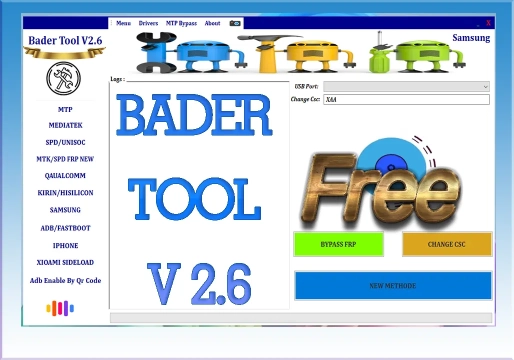
What is Bader Tool V2.6?
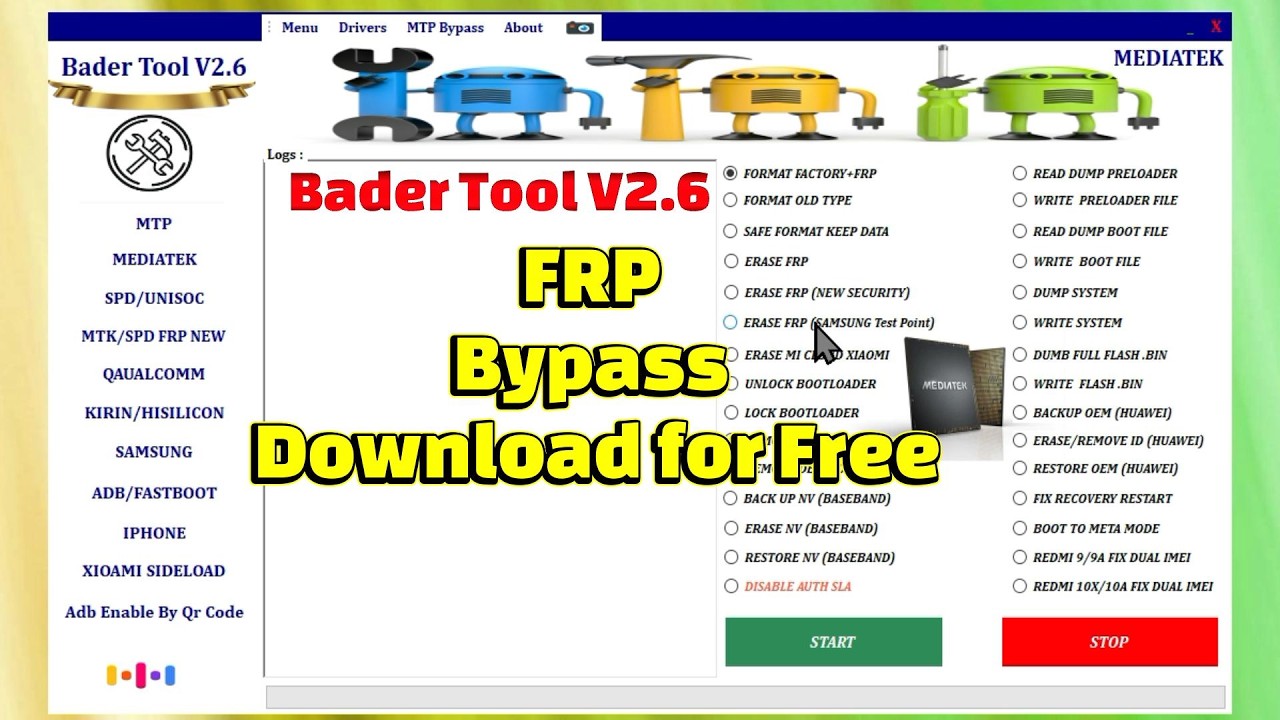
Bader Tool V2.6 is a multifunctional (All-in-One) software utility for Windows developed specifically for technicians and mobile phone repair professionals. The tool works in the management, repair, and unlocking of Android smartphones from various brands, offering a centralized interface to interact with the device's operating system in service mode, Fastboot, ADB, or EDL.
What is it used for in technical support?
In the daily routine of a technical workbench, time and multi-brand compatibility are crucial. Bader Tool V2.6 is mainly used to solve highly complex software issues that prevent the use or legitimate resale of devices, such as:
- Removal of Google account locks (FRP) after factory resetting devices whose customers forgot their email credentials.
- Recovery of devices locked on pattern, PIN, or numeric password lock screens.
- Correction of corrupted partitions and management of security files on specific processors.
- Advanced customization and software maintenance procedures, such as Bootloader manipulation and NVRAM partition backup.
Main functions and features
Version V2.6 consolidates a diverse set of modules focused on the main hardware platforms in the mobile market:
1. Screen Unlock Module
- Formatting and Reset: Complete clearing of passwords, patterns, and PINs.
- Removal without data loss: On compatible models and specific system versions, performs password reset while preserving the user's files.
- ADB Commands: Quick shortcuts to reset credentials in enabled environments.
2. FRP (Factory Reset Protection) Bypass
- Multi-Processor Support: Covers MediaTek (MTK), Qualcomm, Spreadtrum (SPD/Unisoc), and Samsung devices.
- QR Code Bypass (Samsung): Optimized feature to force activation of ADB mode on devices from the Korean brand by reading a QR code.
- MTK Authentication Bypass: Circumvents security and authentication barriers required in flash or FRP routines on recent MediaTek processors, including in BootROM and EDL modes.
- Browser Integration: Automated shortcuts to open browsers and enable USB Debugging on brands such as Infinix and Tecno.
- Advanced Compatibility: Integrated support for recent Android versions (12, 13, and 14).
3. Advanced Tools and Adjustments
- Removal of Specific Accounts: Modules dedicated to unlinking Mi Cloud accounts (Xiaomi) and removing Demo Mode on brands such as Oppo and Vivo.
- Partition Management: NVRAM/NV Backup and Restore routines for preserving IMEI and network signal.
- Bootloader Control: Direct functions to lock or unlock the bootloader on supported devices.
How to use the tool
Although the interface is divided into intuitive tabs by manufacturers and chipsets, correct execution requires following a strict operational standard to avoid communication errors:
- Environment Preparation:
- Make sure to use a Windows operating system (7, 10, or 11) with Administrator privileges.
- Previously install all necessary driver packages on the PC: Samsung USB Drivers, MediaTek Preloader VCOM, Qualcomm HS-USB QDLoader, and SPD drivers.
- Connecting the Device:
- Turn off the smartphone and connect the USB cable while holding down the shortcut buttons corresponding to the processor (e.g., Volume Up + Volume Down for MTK BROM mode, or EDL mode for Qualcomm).
- Selecting the Function:
- Open Bader Tool V2.6 and navigate to the tab corresponding to the manufacturer or processor type of the connected device.
- Select the desired operation (e.g., Remove FRP or Format Data/Reset Lock).
- Execution:
- Click the corresponding execution button and wait for the progress in the tool's status bar until success is confirmed (Done or OK).
- Click the corresponding execution button and wait for the progress in the tool's status bar until success is confirmed (Done or OK).
Compatibility and Requirements
| Requirement / Characteristic | Details |
|---|---|
| Operating System | Windows (64-bit architecture recommended). |
| Supported Platforms | Smartphones based on MediaTek, Qualcomm, Spreadtrum/Unisoc chipsets, and the Samsung ecosystem. |
| Dependencies | Internet connection for checking modules and updated driver packages installed on the computer. |
Limitations and Essential Precautions
It is essential to be aware of the risks when using system modification tools:
- Data Security: Most screen lock removal procedures result in the total loss of user data stored in internal memory. Always perform a backup whenever the system allows prior access.
- Software Integrity: Incorrect use of writing options or forced resetting of sensitive partitions (such as NVRAM or Bootloader) can cause loss of network signal (Null IMEI) or leave the device unrecoverable (Hard Brick).
- Security Updates: Devices with very recent security patches or specific Firmware versions may block old exploits used by generic utilities, requiring alternative methods or physical Test Points on the board.
Frequently Asked Questions (FAQ)
Does Bader Tool work on any Android version?
The tool has integrated support for recent Android versions, including versions 12, 13, and 14. However, effectiveness may vary depending on the security patch installed on the device.
Can I remove the password without losing my data?
On compatible models and specific system versions, Bader Tool offers the "Removal without data loss" function. However, in most cases of formatting or factory reset, data will be erased.
Which drivers do I need to install before use?
You must install Samsung USB drivers, MediaTek Preloader VCOM, Qualcomm HS-USB QDLoader, and SPD drivers to ensure correct communication between the PC and the smartphone.
What happens if I make a mistake when writing the NVRAM?
Incorrect use can cause loss of network signal (Null IMEI) or make the device unrecoverable (Hard Brick). It is essential to have technical knowledge before manipulating sensitive partitions.
⚠️ Warning!
Before using the Program, you need to temporarily disable your Antivirus because it may flag the file as a potential threat, but it is a false positive.
I test every program I share here before posting it, however I cannot guarantee 100% that they are completely safe since I am not the creator of the programs.
I strongly recommend that you create a restore point on your computer before installing any program, so if you notice that the program is not safe, you can simply revert the restore point to the previous state.
Important: if you do not trust it, do not use it and look for other options.
📥 Download Information
- Scroll down to the Download section.
- Check the box I agree to the terms of use
- Then click on Reveal links
- Wait 5 seconds
- Use any of the 2 links
- ⚠️Warning: The download file is compressed with the password “mixdow.com”.
🔐 Site Download Section
To unlock the links, check the box below and click the button:
To get started, make sure you have the basic drivers installed:
DOWNLOAD REQUIRED DRIVERS HEREAttention: Some New FRP Tools use a "bypass" method that requires a special driver filter called LibUSB.
DOWNLOAD LIBUSB HEREFor Unlock Methods that require ADB or Fastboot Mode:
DOWNLOAD ADB AND FASTBOOT DRIVERS HERERequired to put the Qualcomm device into Emergency Download (EDL) mode.:
Download Qualcomm HS-USB QDLoader 9008 DriverI do not endorse or encourage the unlocking of stolen/blocked cell phones.
Anyone who uses these posts for any illegal purpose will be solely responsible for their activity.
Legal Notice:
The content of this Website, including any information about software, downloads, and third-party links, is provided for informational purposes only. The author of this Website is not responsible for any damage, directly or indirectly, caused by the download, installation, or use of any software mentioned on this website.
Disclaimer:
By accessing and using this Website, you agree to hold the author harmless from any liability for:
Hardware or software damage:
Including, but not limited to, viruses, worms, trojans, or other malicious code that may infect your system.
Data loss:
Copyright violations:
Downloading and using software without the proper licenses may result in copyright violations.
Illegal acts:
Misuse of software may be considered an illegal act and result in legal consequences.